Member Profile
The Member Profile is where each member maintains their own record. Contact details, privacy choices, communications preference and password all live here, and members update them themselves rather than asking someone in the club to do it.
Administrators and anyone with the Member Manager role can also update a member's record from the Club Management Portal, for members who want help with it or who don't use the website. See Members.
Signed-in members reach it from the Profile link in the site header, or under Members in the main navigation.
What members can change
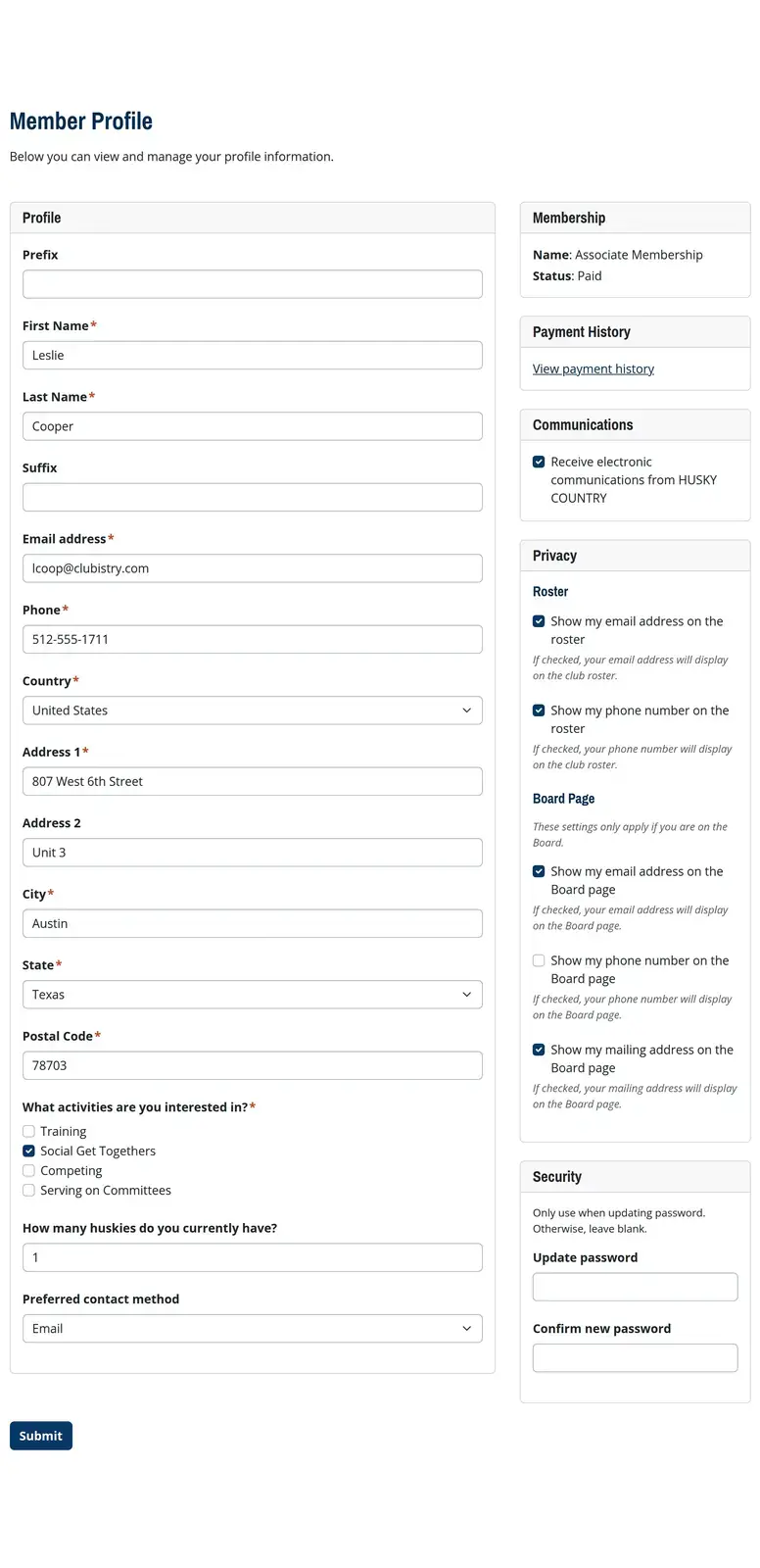
The page is a set of cards, each covering one part of the member's record.
- Profile holds their name, contact details and mailing address, along with any member custom fields you've marked Use on Profiles.
- Membership shows their membership type and current status, and their payment link when one is due.
- Payment History opens their full record of what they've paid.
- Communications holds one choice, whether they receive electronic communications from the club.
- Privacy holds their choices about what other people can see.
- Security is where they set a new password.
What a member saves updates their member record directly. There's nothing for an administrator to approve.
Membership status and payments
The Membership card shows that member's membership type and current status.
When they have something to pay, a Pay Now button appears beside it and takes them to checkout for their own renewal. It shows up only when a payment is due, and only if your club takes payments through Clubistry.
Payment History lists membership payments, e-commerce orders and paid form submissions together in one place.
Privacy choices
The Privacy card holds two separate groups of choices. One controls the roster. The other controls the Board of Directors page.
Roster
Every member chooses whether their email address and phone number appear on the roster.
A third choice, Show my mailing address on the roster, appears only when your club has turned on Board View honors member privacy settings in Roster Settings. That setting is off by default. While it is off, board members and administrators see every member's contact details on the roster whatever individual members have chosen, and the roster says so on screen. Turn it on and the board view follows each member's choices instead.
Board of Directors page
Members who serve on the board get three more choices, covering their email address, phone number and mailing address on the Board of Directors page. That's the page on your website that lists your board, and on most club sites it's public.
These choices are separate from the roster choices above, which is usually what a board member wants. Plenty of them are happy to be listed in full on the roster, which only signed-in members can see, while keeping the same details off a page the whole world can read.
A board position can also carry contact details of its own. When it does, those are what appear on the page, and the member's choices don't affect that listing. See Board.
The Member Profile page is protected
Clubistry protects the profile because members reach it at a fixed address that other parts of your site link to. You can't rename it and you can't delete it. You can switch it off with the Active toggle, though that takes self-service away from every member at once.
The form itself comes from the Profile Page section, so you never build the fields by hand. The page title, who's allowed to see it, and the wording above the form all behave the way they do on any other page, and you edit them in Pages.
Members land on the Member Dashboard when they sign in. The profile is where they go when they want to change something.
Related topics
- Pages - Edit the profile page's title, permissions and wording.
- Member Custom Fields - Choose which extra fields appear on profiles.
- Roster - How privacy choices affect the member directory.
- Board - How the Board of Directors page handles contact details.
- Member Dashboard - The page members land on when they sign in.