
Get the next one in your inbox
Practical tips for working in a club. Occasional emails, easy unsubscribe.
New! Full Site Search
08/10/2026
We're excited to announce that Clubistry websites now include full site search. Search can be launched from the header on any page. It reaches every kind of content your site holds, including the text inside your uploaded documents.
What search covers
Search covers nine kinds of content.
- Pages, including the text inside your page sections
- News and articles
- Documents
- Events
- FAQs
- Forms
- Photo albums
- Board and officer listings
- Store products, if your club runs a store
Results come back grouped by kind, each with a short snippet showing the matched words in context. A member hunting for the bylaws, the fall show entry form, and last spring's newsletter finds all three from the same box.
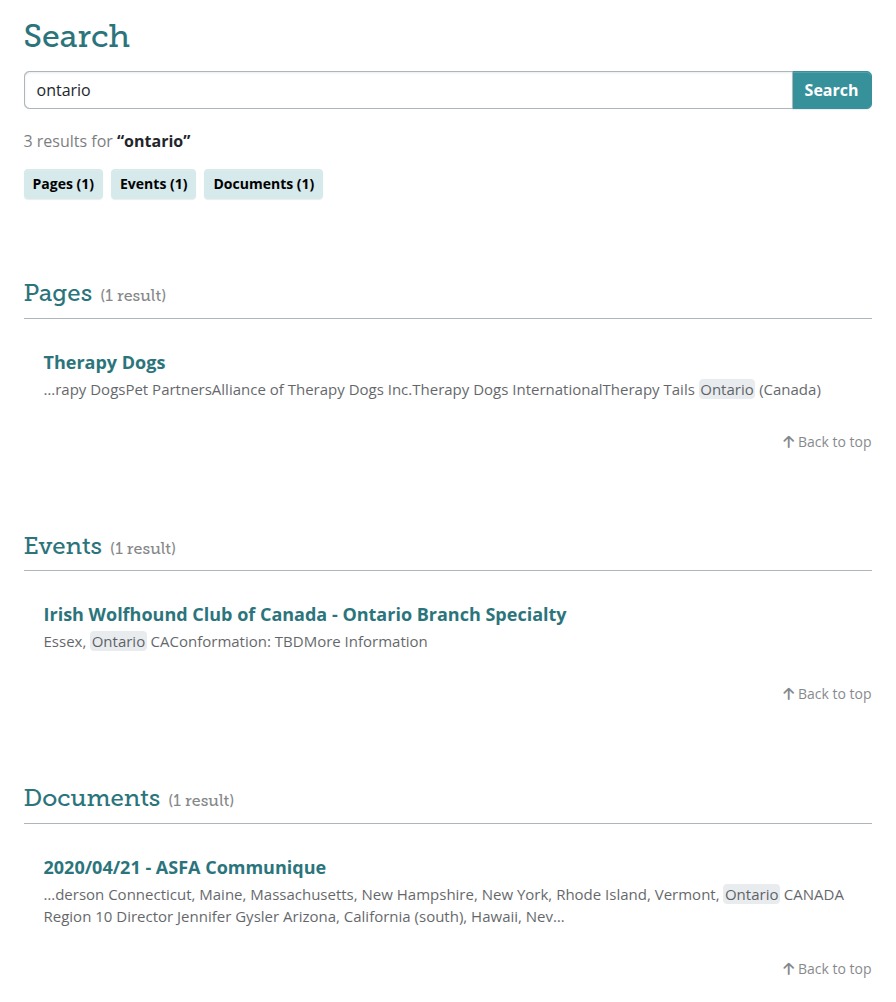
One thing search deliberately leaves out is people. Member records stay out of results, because your roster page already handles that and it respects your privacy settings. Search is for content.
Members-only content stays members-only
Search follows the permissions you already set, for every result, every time. A visitor who isn't logged in sees only the pages and files you've made public. A logged-in member sees public content plus whatever their roles allow. Board-only documents stay invisible to members who aren't on the board.
You don't need to review your permissions or re-check anything before this arrives. Search reads the same settings your menus and pages already use, so if a page is hidden from the public today, it stays hidden in search results too.
Board and officer listings are searchable by name, position, and bio. Contact details on those records stay out of the index, so a search engine or a curious visitor can't pull an officer's email or phone number out of your site through search.
Partial words find whole ones
People rarely type the exact word that's on the page. Search handles that by matching on the start of a word, so a search for "garden" also turns up "gardening" and "gardeners", and "cardio" turns up "cardiac" and "cardiomyopathy". Type the root you're sure of and let the search find the longer words around it.
What it can't do yet is match words that mean the same thing but share no spelling, so "heart" won't find "cardiac". If that turns out to matter for the way your members talk about your subject, tell us and we'll look at it.
Nothing to set up
Search is on for every club site. There's no setting to switch on, no index to build, and nothing to configure. It works on phones too, where the search field sits at the top of the menu panel when you open it.
Everything you publish from here on gets picked up automatically as you save it, so your search results stay current without any maintenance from you.
Your documents are searched inside, not just by name
Search reads the text inside your uploaded files. If your bylaws mention a quorum rule, a member searching for "quorum" finds the bylaws even though that word appears nowhere in the file name. The same goes for meeting minutes, newsletters, show premiums, and grant guidelines. It covers PDFs, Word documents, spreadsheets, presentations, and plain text files, and a newly uploaded document becomes searchable shortly after you add it.
One kind of file works differently. Some PDFs are photographs of paper rather than digital text, which is what you get when a document has been scanned. There are no readable words inside a file like that, so those are found by their name instead. If your older material was scanned in, its file name is what makes it findable.
That's worth keeping in mind when you name things. "Minutes-2026-03.pdf" tells a member what they've found. "scan_0042.pdf" doesn't.
Like this? Get the next one in your inbox.
Practical articles, tips, and ideas for working in a club. Occasional emails, easy unsubscribe.