
Get the next one in your inbox
Practical tips for working in a club. Occasional emails, easy unsubscribe.
Improvements to Membership Applications
04/30/2026
Membership applications have picked up several improvements over the past year. Some are admin tools you've asked for, some are quality-of-life fixes for applicants, and some are quiet wins on the security side.
Offline applications join the same workflow as online ones
Some prospective members just aren't going to fill out an online form. Maybe they handed you a paper application at a meeting, maybe they mailed it in, maybe they emailed you a PDF, or maybe they're not comfortable using the form online. Until now, those applications lived outside the system in email threads and file folders, while online applications had their own clean workflow.
From the Manage Applications page on your site, you can now enter an offline application directly. Fill in the basic data that maps to the member record, upload the original application, and attach any supporting documents that came with it. From there, the offline application sits in your queue alongside online applications and goes through the same review and approval process.
The payoff comes at review time. Everything you need for an applicant is right there on the application record, instead of having to hunt down the original application in your email and supporting materials in a folder somewhere. Approval is faster, and online and offline applicants move through the same process.
When you enter an offline application, the form is shorter than the public version. Fields that map to the eventual member record are still required: name, address, phone, email, and any member custom fields you've set to appear on applications. Those values are needed to create the member when the application is approved. But fields that don't map to member data, like application-specific questions about why someone wants to join, become optional. Those answers are usually on the attached paperwork already.
Attach supporting documents to any application
You can attach supporting documents to any application, whether the applicant submitted it online or you entered it yourself as an offline application. Sponsor letters that arrive separately, scanned paperwork sent in by mail alongside an online submission, and any other supporting material live with the application record instead of in a separate folder somewhere.
Limited edit access for Admins and Application Managers
Sometimes an applicant gives you a phone number with a typo, or moves before their application is approved. Admins and Application Managers can now make limited edits to applications, scoped to contact information only. Beyond that, the application is preserved as the applicant submitted it.
Reorder application forms on your Join page
If your club has multiple application forms for different membership types, you can now control the order they appear in on the Join page. Drag them into the sequence that makes sense for your visitors.
Email re-entry to catch typos
The application form has a new email re-entry field for visitors who aren't already logged in. Applicants type their email twice, and the form requires the two to match before submission. This catches typos at the source, so an application is less likely to land in your queue with an email address the applicant can never receive replies at.
Logged-in members don't see this field. Their email is already on file and gets filled in for them.
Mark an applicant's email as confirmed yourself
Most applications go through an email-click confirmation step, where the applicant clicks a link in an automated email to confirm their address. If you've already verified an applicant's email another way (you've emailed them directly, talked on the phone, or know them personally), Application Managers can now mark the email as confirmed on the application record without waiting for the link click.
Edit-link with code
If an applicant needs to edit an application that's already in progress, they request a one-time edit link by entering the email address they used on the application. The link gets emailed to them, and clicking it opens the edit form. This protects the application from being edited by anyone who might guess the URL.
Spam protection
Spam applications were piling up in some clubs' lists, especially clubs whose application page had been around long enough to attract bots. Three changes now make this much easier to manage.
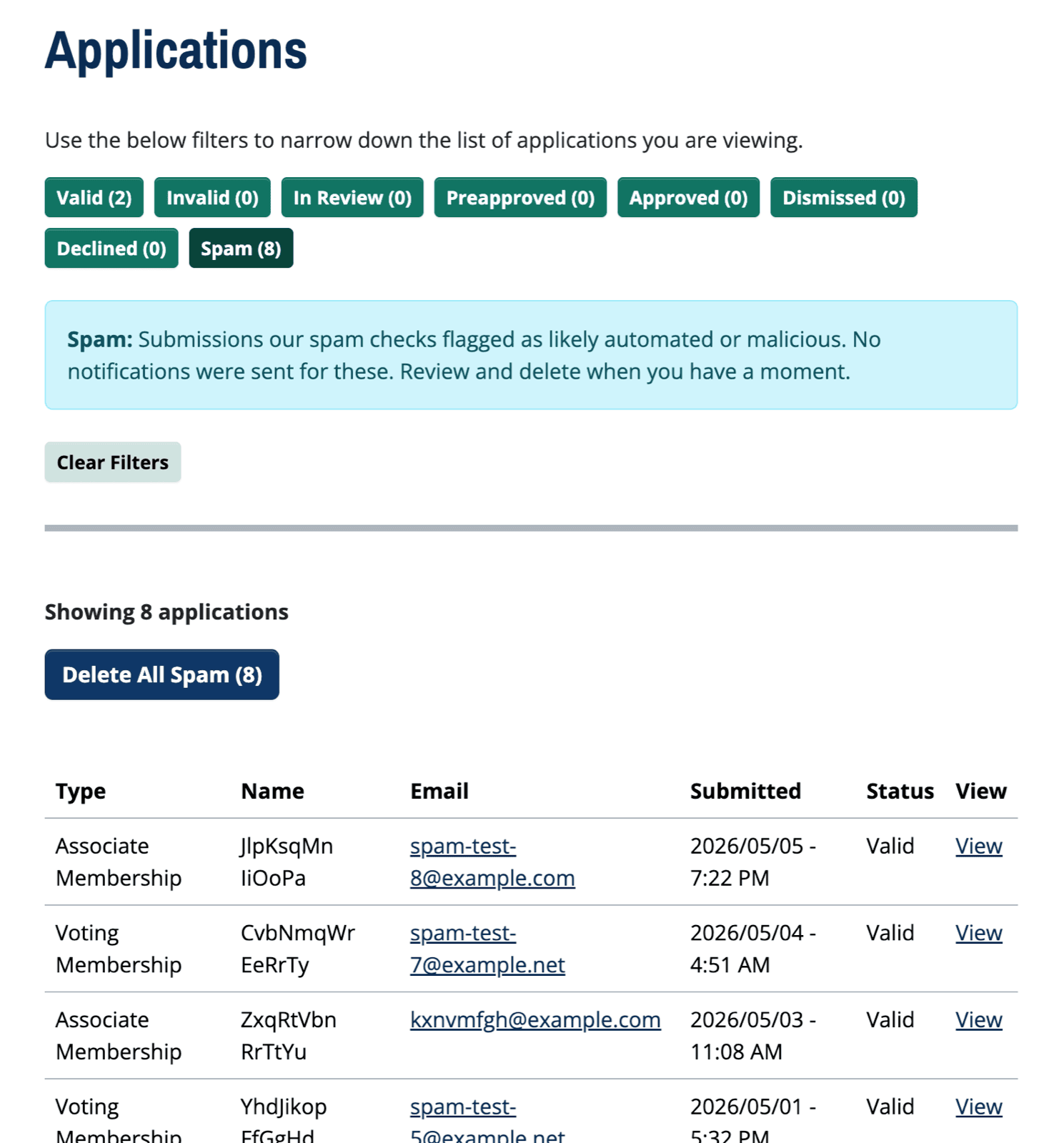
- Spam is hidden from your Applications list by default. Previously, spam our checks had caught was still showing in your list and inflating the status counts at the top. Now those numbers reflect real applications that need your attention.
- A new Spam tab appears at the end of the filter row for Admins and Application Managers. Click it to see what's been caught, with a one-click "Delete All Spam" button to clear it out.
- Automatic blocking of known spam sources. Submissions from internet addresses known to send spam are now rejected before they reach your list, so you'll see fewer spam records pile up over time.
If you haven't been tracking spam submissions before now, that's likely because the existing checks have been quietly catching them all along. This update just makes cleanup easier and your visible counts more accurate.
Like this? Get the next one in your inbox.
Practical articles, tips, and ideas for working in a club. Occasional emails, easy unsubscribe.